TESAN İLETİŞİM A.Ş
Bahçelievler, İstanbul
Eşleşen marka yok.
Türkçe çevirisi hazırlanıyor, şimdilik üretici sitesindeki İngilizce metin gösteriliyor.
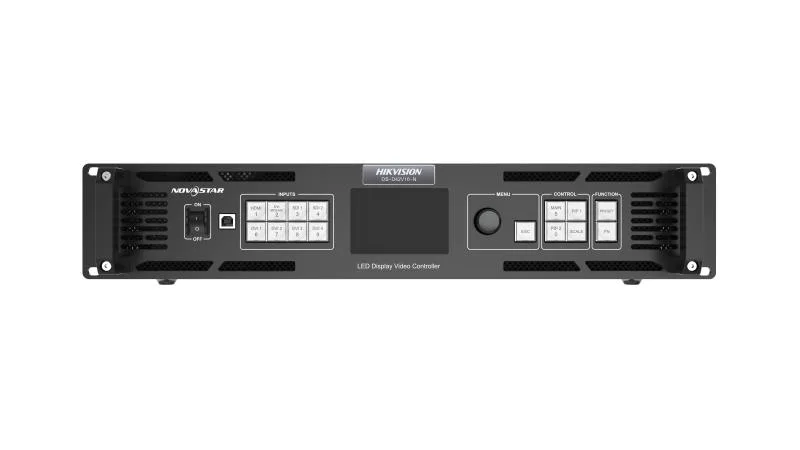
16 Ethernet output ports load up to 10,400,000 pixels. Up to 4 DVI inputs can form an independent input source, which is DVI Mosaic. Supported frame rates include 23.98 Hz, 29.97 Hz, 47.95 Hz, 59.94 Hz, 71.93 Hz and 119.88 Hz.. Up to 4 devices can be linked to load a super large screen when used together with the video distributor. Up to 10 presets can be saved for future use. Custom EDID and standard EDID supported. In backup mode, when the signal is lost or the Ethernet port fails on the primary device, the backup device will take over the task seamlessly
| Brightness Control | 1-100 Levels |
|---|---|
| Frame Frequency | 25HZ-120HZ |
| Grey Level | 1024 |
| Display Color | 1 Billion |
| Processing Depth | 10bit |
| Image Scaling | Support |
| Product Model | DS-D42V16-N |
| Chassis Height | 2.1 U |
| Chassis Width | Full Width |
| Average Consumption | ≤70W |
| Number of power interfaces | 1 |
| Power interface specifications | 100~240 VAC, 50/60 Hz |
| Working Temperature | 0°C ~ 50°C |
| Storage Humidity | 10% ~ 85% |
| Working Humidity | 20% ~ 85% |
| Storage Temperature | -20°C ~ 60°C |
| Packaging Size (W × H × D) | 530.0 mm × 420.0 mm × 193.0 mm |
| Net Weight | 6.22KG |
| Gross Weight | 9.78KG |
| Dimensions (W × H × D) | 482.6 mm × 372.5 mm × 94.6 mm |
| Packing List | 1x EU power cord 1x US power cord 1x UK power cord 1x Cat 5e Ethernet cable 1x USB cable 1x DVI cable 1x HDMI cable 1x Quick Start Guide 1x Certificate of Approval |
| Product Type | LED Controller |
| Audio Input Interface(s) | NA |
| Audio Input Interface Type | NA |
| Video Input Interface(s) | 7 |
| Video Input Interface Type | 1 HDMI2.0+4 DVI+2 3G-SDI |
| Max. Input Resolution | 4K |
| Video Input Resolution | HDMI2.0 interface Maximum supported resolution: 4096*2160@60Hz Minimum supported resolution: 320*180@60Hz Customizable resolution, total resolution not more than 8.85 Million@60 Limit width: 320~8192 Alignment: 4 alignment Limit height: 180~8192 Alignment: 1 alignment Support HDCP1.4 Does not support interlaced signal input 2 SDI Max. input resolution: Up to 1920×1080@60Hz Support for interlaced signal input and deinterlacing processing Does not support input resolution settings 4 DVI Single link DVI connector, with max. input resolution up to 1920×1200@60Hz Four DVI inputs can form an independent input source, which is DVI Mosaic Support for custom resolutions − Max. width: 3840 pixels − Max. height: 3840 pixels HDCP 1.4 compliantS Does not support interlaced signal input |
| Video Input Processing Characteristics | Processing depth 8/10/12bit Sampling format: RGB:444 YUV:444 YUV:422 |
| Max. Output Resolution | 10.4 Million |
| Loading Capacity for Video Output to LED | Single port with load 650000 Width 1~16384 Height 1~8192 |
| LED Loading Interfaces | 16 |
| LED Loading Interface Type | RJ45 |
| Number of video ring pass output interfaces | NA |
| Video looping output interface type | NA |
| Video looping output resolution | NA |
| Audio Output Interface(s) | NA |
| Audio Output Interface Type | NA |
| Screen | TFT |
| Key | Power switch:Power on or power off the device. Input source buttons: On the layer editing screen, press the button to switch the input source for the layer; otherwise, press the button to enter the resolution settings screen for the input source :Status LEDs: On (orange): The input source is accessed and used by the layer. Dim (orange): The input source is accessed, but not used by the layer. Flashing (orange): The input source is not accessed, but used by the layer. Off: The input source is not accessed and not used by the layer. Knob:Rotate the knob to select a menu item or adjust the parameter value. Press the knob to confirm the setting or operation ESC button:Exit the current menu or cancel the operation Layer buttons:Press a button to open a layer, and hold down the button to close the layer. MAIN: Press the button to enter the main layer settings screen. PIP 1: Press the button to enter the settings screen for PIP 1. PIP 2: Press the button to enter the settings screen for PIP 2. SCALE: Turn on or turn off the full screen scaling function of the bottom layer. Function buttons:PRESET: Press the button to enter the preset settings screen. FN: A shortcut button, which can be customized as a shortcut button for Synchronization (default), Freeze, Black Out, Quick Configuration or Image Color function |
| pilot lamp | On (orange): The input source is accessed and used by the layer. Dim (orange): The input source is accessed, but not used by the layer. Flashing (orange): The input source is not accessed, but used by the layer. Off: The input source is not accessed and not used by the layer. |
| Control network port | ETHERNET:1,Connect to the control PC for communication. Connect to the network. USB:2 |
| 3D interface | NA |
| IR input | NA |
| Serial Interface | RS232:1,Connect to the central control device |
| Light perception | NA |
| USB | USB 2.0 (Type-B): − Connect to the PC for debugging. − Input connector to link another device USB 2.0 (Type-A): Output connector to link another device |
| On-off | Switch |
Bu site, hizmeti çalıştırmak için gerekli teknik çerezler kullanır. Pazarlama iletişimi izniniz talep formunda ayrıca ve işaretlenmemiş olarak sorulur. Detaylar için Çerez Politikası ve KVKK Aydınlatma Metni'ni inceleyebilirsiniz.